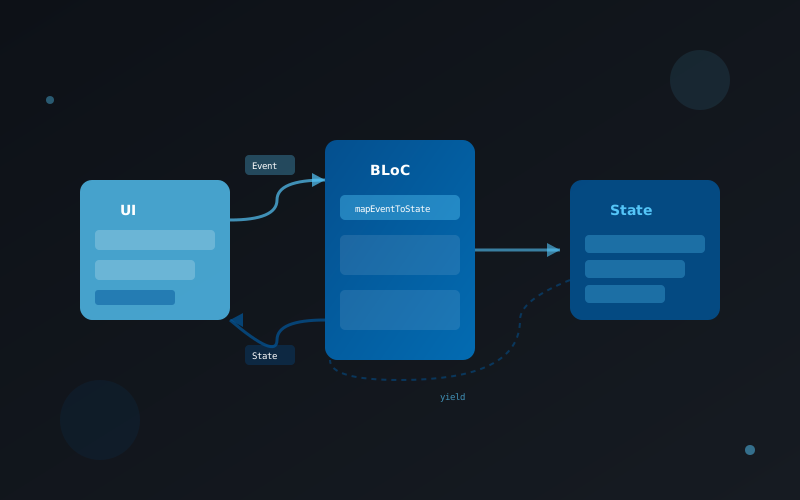
State management is one of the most important aspects of building Flutter applications. The BLoC (Business Logic Component) pattern has become one of the most popular approaches, providing a clean separation between business logic and UI. Let's explore how to implement it effectively.
Setting Up BLoC
First, add the flutter_bloc package to your pubspec.yaml and create a simple counter BLoC:
// counter_event.dart
abstract class CounterEvent {}
class IncrementEvent extends CounterEvent {}
class DecrementEvent extends CounterEvent {}

// counter_state.dart
class CounterState {
  final int count;
  CounterState(this.count);
}

// counter_bloc.dart
import 'package:flutter_bloc/flutter_bloc.dart';

class CounterBloc extends Bloc<CounterEvent, CounterState> {
  CounterBloc() : super(CounterState(0)) {
    on<IncrementEvent>((event, emit) {
      emit(CounterState(state.count + 1));
    });

    on<DecrementEvent>((event, emit) {
      emit(CounterState(state.count - 1));
    });
  }
}
Using BLoC in Widgets
Now let's connect the BLoC to our UI using BlocProvider and BlocBuilder:
class CounterPage extends StatelessWidget {
  @override
  Widget build(BuildContext context) {
    return BlocProvider(
      create: (context) => CounterBloc(),
      child: CounterView(),
    );
  }
}

class CounterView extends StatelessWidget {
  @override
  Widget build(BuildContext context) {
    return Scaffold(
      body: Center(
        child: BlocBuilder<CounterBloc, CounterState>(
          builder: (context, state) {
            return Text('Count: ${state.count}');
          },
        ),
      ),
      floatingActionButton: FloatingActionButton(
        onPressed: () {
          context.read<CounterBloc>().add(IncrementEvent());
        },
        child: Icon(Icons.add),
      ),
    );
  }
}
Conclusion
The BLoC pattern provides a scalable and testable architecture for Flutter apps. By separating business logic from UI, your code becomes easier to maintain and test. Start with simple use cases and gradually apply it to more complex features.